
Showing posts with label Hijacked e-mail. Show all posts
Showing posts with label Hijacked e-mail. Show all posts
Wednesday, July 14, 2010
How To Identify an E-mail is Malicious
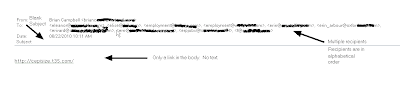
At some point, you have either been faced with or you will be faced with receiving an e-mail from someone you know personally that looks a bit odd. What are some of the things that you can look for to make that decision to click a link or not? This is an example of an e-mail that was actually delivered to a friends inbox and the link in the e-mail was a malicious download. Take a close look at the recipients list, you can see in this example that they are listed in alphabetical order. This is an indication that the attacker is sending e-mails sequentially to all contacts in a hijacked e-mail account. Most times, the SUBJECT line is blank. Another clue is there will be no text in the body of the e-mail, just a link. Remember, if you ever have a question about the validity of an e-mail, it is better to error on caution and just delete it.

Help My E-mail Account Has Been Hijacked!
Have you been told by someone you know that they think your e-mail account has been hacked? It seems like you see it more and more today where people get their e-mail accounts hijacked. E-mails are sent to everyone listed in the e-mail account's contact list that contains a link which is malicious. If any of your friends who open the e-mail from your hijacked e-mail account and they click on the link, more than likely their PC has just had some malicious payload installed on their PC. And so the cycle continues. So what do you do if your e-mail account has been hijacked? Here are some steps you can take to gain control back from the cybercriminal.
More than likely you logged into your personal e-mail account on a PC that had some sort of malicious software installed that was able to steal your login credentials for that account. If you only log into your account from your home PC, then your home PC has some sort of malicious software installed and it needs to be cleaned. Make sure you have an anti-virus product installed and that the virus signatures are current, then scan your PC and remove any malicious software that is found. If the scan comes back clean, I recommend downloading free version of Malwarebytes Anti-malware tool from http://malwarebytes.org/. Follow the instructions and remove any malicious software that is found.
Removing the malicious software is just the first step. You need to regain control of your e-mail account by doing the following steps.
1. Change the account password and make it a strong password.
2. Confirm that the "alternate e-mail address" is your other e-mail and not the criminal attacker's so that they won't be notified of the password change and other changes.
3. Change the answers to your security questions.
4. Change any other information that your e-mail account administrator would use to verify the account.
5. If all these efforts fail, open a new account, notify the e-mail administrator and your contacts, and close down the old account.
As always, the best protection from malicious software and other online attacks is to have a firewall and anti-virus software that is kept current. Also patching 3rd party applications like Adobe Reader/Flash, Java, as well as your Windows updates is critical to stay protected. Probably the best tool you have against is your "online behavior". Stay away from peer-to-peer sites where you can download "free" music and software, don't surf porn, and don't randomly click on links without checking into things. Your motto when online should be "trust no one". Combining all these will keep you protected against malicious software.
More than likely you logged into your personal e-mail account on a PC that had some sort of malicious software installed that was able to steal your login credentials for that account. If you only log into your account from your home PC, then your home PC has some sort of malicious software installed and it needs to be cleaned. Make sure you have an anti-virus product installed and that the virus signatures are current, then scan your PC and remove any malicious software that is found. If the scan comes back clean, I recommend downloading free version of Malwarebytes Anti-malware tool from http://malwarebytes.org/. Follow the instructions and remove any malicious software that is found.
Removing the malicious software is just the first step. You need to regain control of your e-mail account by doing the following steps.
1. Change the account password and make it a strong password.
2. Confirm that the "alternate e-mail address" is your other e-mail and not the criminal attacker's so that they won't be notified of the password change and other changes.
3. Change the answers to your security questions.
4. Change any other information that your e-mail account administrator would use to verify the account.
5. If all these efforts fail, open a new account, notify the e-mail administrator and your contacts, and close down the old account.
As always, the best protection from malicious software and other online attacks is to have a firewall and anti-virus software that is kept current. Also patching 3rd party applications like Adobe Reader/Flash, Java, as well as your Windows updates is critical to stay protected. Probably the best tool you have against is your "online behavior". Stay away from peer-to-peer sites where you can download "free" music and software, don't surf porn, and don't randomly click on links without checking into things. Your motto when online should be "trust no one". Combining all these will keep you protected against malicious software.
Tuesday, May 5, 2009
Friend's E-mail Account Hacked
The other day, I received an e-mail from a friend with a subject line of "Look". The body of the e-mail was short and sweet. It said "* Hi! Click the link, there is something funny for you" followed by a link that looked innocent enough to me. The computer security person in me thought this was a bit strange so I did a little checking on the site that was referenced in my friends e-mail.
After some checking, I found that the site was considered malicious and was hosted in China. I responded back to my friend and said that the computer security person in me wondered if he really had sent this. No response. Another few days and I get another e-mail from him with the same link. At this point, I contact him and he says no he didn't send me or any of the other contacts he had in his address book that were included on this e-mail.
Lesson, my friend had his e-mail account hijacked. The attacker who had control was trying to take advantage of the trust between my friend and his contacts in his address book. I sent a response to all the others who received the e-mail warning them of the malicious link. I never heard back from anyone but I had done my part.
Be careful when you receive an e-mail from a friend with a link, and this is also true of the other social networks like FaceBook, MySpace, and LinkedIn. My motto in computer security is to trust no one. Don't just randomly click on links just because one of your friends sends you a link. Hijacked accounts will send out messagse with malicious links and take advantage of the trust that is built up on these types of networks.
Be careful out there and stay safe. Happy Tuesday!
After some checking, I found that the site was considered malicious and was hosted in China. I responded back to my friend and said that the computer security person in me wondered if he really had sent this. No response. Another few days and I get another e-mail from him with the same link. At this point, I contact him and he says no he didn't send me or any of the other contacts he had in his address book that were included on this e-mail.
Lesson, my friend had his e-mail account hijacked. The attacker who had control was trying to take advantage of the trust between my friend and his contacts in his address book. I sent a response to all the others who received the e-mail warning them of the malicious link. I never heard back from anyone but I had done my part.
Be careful when you receive an e-mail from a friend with a link, and this is also true of the other social networks like FaceBook, MySpace, and LinkedIn. My motto in computer security is to trust no one. Don't just randomly click on links just because one of your friends sends you a link. Hijacked accounts will send out messagse with malicious links and take advantage of the trust that is built up on these types of networks.
Be careful out there and stay safe. Happy Tuesday!
Subscribe to:
Posts (Atom)