Showing posts with label Computer Security. Show all posts

Sunday, November 28, 2010

Scan with Microsoft's Malicious Software Removal Tool

One of the tools that comes with Windows operating systems is the Malicious Software Removal Tool. It updates with the monthly MS updates and it runs a quick scan once a month. However, it may be a good idea to actually add another layer of security and run a full scan from time to time.

So how do you run this tool? First, press the Windows logo key+R. This will bring up the following window.
You just type 'mrt' in the input box and hit the OK button. This will bring up the dialog box for the MRT.
Now you just click on the Next> button and you will be presented with the following dialog box.
You then select the Full Scan radio button and click on the Next> button to start the scan off. It may take some time to actually complete, but this will give you another layer of security for your home PC.

Now this will only find known software that Microsoft has added to the MRT so it isn't a silver bullet. Stay safe out there

Sunday, November 21, 2010

Secunia's PSI Documentation

I've written several times in the past about the security company Secunia and the tool that they have created called PSI (Personal Software Inspector). Here is a link from bleepingcomputer.com that helps users how to use PSI. This is a tool that helps the average user to keep up to date with all those 3rd party applications like Adobe, Java, iTunes, Safari, etc. I am testing a newer version of PSI that is in Beta. This new version will have many automated updates to help the average user get through the forest of 3rd party applications. When this beta version is released, I will let you know.

The reason why this is so important is that cyber criminals are exploiting these 3rd party applications to install the malicious software that infects so many people's PCs. Be safe out there.

Adobe Reader X Update

OK, I jumped at the chance to download the new updated Adobe Reader that is introducing sandboxing. I haven't had too much of a chance to play with it yet, but one thing I've noticed right away is some settings I changed a long time ago. I've written about those setting changes in earlier blog posts and can be found here and here.

Once you changed these settings, any updates to Reader would carry those changes through the next version released. I did notice that on Adobe Reader X, these settings went back to their default value you so you will want to repeat the steps detailed in the previous blog posts related to disabling Javascript and disabling the setting under Trust Manager.

Stay safe out there.

Friday, November 12, 2010

Is that E-mail Actually from your Family Member or Friend?

You get an e-mail from a family member or friend and they have sent it to several others in the TO line of the e-mail. And many times the SUBJECT line is blank or possibly contains RE:. To top it all off, they don't type anything in the body of the e-mail. You just see a link. No explanations, just the link. So should you click it? Probably not. If you do, most likely you will be directed to some sort of Canadian Pharmacy selling Viagra or Cialis. What you don't see will harm you in ways you won't like. Malware is installed that makes your PC now under the cyber attacker's control.

To stay safe, you must make the correct decisions from time to time. And the one thing you can't do is trust that that e-mail is really from your brother, sister, or your BFF. Always question situations like these. If you are really curious, call them and ask them if they sent you something and if they did, then let them know they need to explain what they are sending you next time.

My advice when it comes to electronic communications is , trust no one. You will be better off if you take that advice.

How to Stay Safer Online

So to understand how you can protect yourself against the malicious attackers looking to install their malware on your PC, you have to know what programs attackers are exploiting. Keeping your software up to date with security patches is vital. The top applications that attackers are having success with when it comes to running exploits on your PC include the following:
  1. Java Runtime Engine (JRE)
  2. Adobe Reader/Acrobat
  3. Adobe Flash Player
It is also important to know that these aren't the only things you need to update. Microsoft updates are important. If you don't already have them set to automatically download and install, you should do this. Updating applications like iTunes, QuickTime, Firefox, just to name a few.

It is also important to have some sort of anti-virus installed on your PC and it should be set up to scan on a regular schedule and keep the signatures up to date. I also recommend that you install a great malware removal tool called Malwarebytes Anti-malware. Download and install the free version. You can find it here.

Lastly, your actions can go a long ways in keeping malware off your PC. Knowing if you should click or not IS a really big deal. If something doesn't look right it probably isn't.

These are just a few steps you can take to keep malicious software from being installed on your PC. Protect your family and your financial health from the cyber attackers. Stay safe out there.

Monday, October 4, 2010

Microsoft Security Essentials

In the past, I would advise people to use the free version of AVG Anti-virus software. I have now officially changed. Anytime anyone asks about AV, I will steer them in the direction Microsoft Security Essentials. You can find the Microsoft download page for Security Essentials here. I personally use it on all my Windows boxes.

Monday, July 19, 2010

Malwarebytes Rocks!

You may have had malicious software installed on your PC and you have done searching and found references to Malwarebytes Anti-malware tool. Everything you read about it is true. I recommend it to all my friends. If you don't already, click here to download it and install it. There is a free version but if you are finding that you browse to somewhat risky places on the Internet, then maybe you should purchase the paid for version which gives you better protection.

Below I've listed instructions on how to use the tool.

  • After installing, double click on the Malwarebytes Anti-malware tool and you are
    presented with the Malwarebytes dashboard.
  • Click on the Update tab (the third tab over). Click on the "Check for Updates" button to get the new signatures for MBAM. You need to do this step every time prior to running the tool.
  • After the update is complete, then click on the Scanner tab (this tab is the first you will see when opening MBAM). Select the default scanning option (Perform quick scan) and then click on the Scan button. MBAM will now start scanning your computer for malware. This process can take quite a while, so I suggest you go and do something else and periodically check on the status of the scan. When MBAM is done scanning it will present you with a message box with an OK button. It will either tell you no malicious files found, or if it finds any malicious files, it will then allow you to view the results. Click the OK button.
  • If infected files are found, you will now be back at the main Scanner screen. At this point you should click on the Show Results button. A screen displaying all the malware that the program found will be displayed.
  • You should now click on the Remove Selected button to remove all the listed malware. MBAM will now delete all of the infected files and registry keys. When removing the
    files, MBAM may require a reboot in order to remove some of them. If it displays a message stating that it needs to reboot, please allow it to do so. If the Quick Scan
    option actually found any malicious software, I always recommend that after you have removed and rebooted if needed, then repeat these steps but select the Perform full scan option. For sure this process will take longer because you are scanning your entire PC.
Let me know if you have any questions.

Wednesday, July 14, 2010

How To Identify an E-mail is Malicious

At some point, you have either been faced with or you will be faced with receiving an e-mail from someone you know personally that looks a bit odd. What are some of the things that you can look for to make that decision to click a link or not? This is an example of an e-mail that was actually delivered to a friends inbox and the link in the e-mail was a malicious download. Take a close look at the recipients list, you can see in this example that they are listed in alphabetical order. This is an indication that the attacker is sending e-mails sequentially to all contacts in a hijacked e-mail account. Most times, the SUBJECT line is blank. Another clue is there will be no text in the body of the e-mail, just a link. Remember, if you ever have a question about the validity of an e-mail, it is better to error on caution and just delete it.

Help My E-mail Account Has Been Hijacked!

Have you been told by someone you know that they think your e-mail account has been hacked? It seems like you see it more and more today where people get their e-mail accounts hijacked. E-mails are sent to everyone listed in the e-mail account's contact list that contains a link which is malicious. If any of your friends who open the e-mail from your hijacked e-mail account and they click on the link, more than likely their PC has just had some malicious payload installed on their PC. And so the cycle continues. So what do you do if your e-mail account has been hijacked? Here are some steps you can take to gain control back from the cybercriminal.

More than likely you logged into your personal e-mail account on a PC that had some sort of malicious software installed that was able to steal your login credentials for that account. If you only log into your account from your home PC, then your home PC has some sort of malicious software installed and it needs to be cleaned. Make sure you have an anti-virus product installed and that the virus signatures are current, then scan your PC and remove any malicious software that is found. If the scan comes back clean, I recommend downloading free version of Malwarebytes Anti-malware tool from
http://malwarebytes.org/. Follow the instructions and remove any malicious software that is found.

Removing the malicious software is just the first step. You need to regain control of your e-mail account by doing the following steps.

1. Change the account password and make it a strong password.
2. Confirm that the "alternate e-mail address" is your other e-mail and not the criminal attacker's so that they won't be notified of the password change and other changes.
3. Change the answers to your security questions.
4. Change any other information that your e-mail account administrator would use to verify the account.
5. If all these efforts fail, open a new account, notify the e-mail administrator and your contacts, and close down the old account.

As always, the best protection from malicious software and other online attacks is to have a firewall and anti-virus software that is kept current. Also patching 3rd party applications like Adobe Reader/Flash, Java, as well as your Windows updates is critical to stay protected. Probably the best tool you have against is your "online behavior". Stay away from peer-to-peer sites where you can download "free" music and software, don't surf porn, and don't randomly click on links without checking into things. Your motto when online should be "trust no one". Combining all these will keep you protected against malicious software.

Thursday, April 22, 2010

Adobe Reader Setting to Change

So you need to know what the criminal attackers are exploiting so you can defend against it. Adobe Reader/Acrobat and Adobe Flash are at the top of the list. Earlier I wrote about turning off Javascript in Adobe Reader in this post. I come to you with another setting to change. Pull up your Adobe Reader and then go to Edit>Preferences:

Find the category Trust Manager and highlight it, then uncheck the box seen below in this image.

Trying to stay secure is always a moving target. Setting these options as I have mentioned will help protect against current attacks going on now in the wild.

Stay safe and have a great weekend.

Saturday, April 17, 2010

Defending Against ZeuS Trojan

If you are a small business, school districts, local governments, or local entities like community libraries, and you have someone who works for you who transacts business with your bank online, or possibly you use ACH, you had better listen up. Cybercriminals are looking for you and they want to steal you blind. If you have heard from your local financial institution warning you about ZeuS, you need to find yourself someone who can help you defend agasint this silent attack.

Brian Krebs has a great blog and has been writing about the folks behind the ZeuS kit that is stealing literally millions of dollars each year and it doesnt seem to be getting better. ZeuS has its sights on the smaller businesses who probably don't have the computer security staff to help them take steps to lower this risk.

I'm from the northeastern part of Kansas and can help you with a risk assessment to let you know if you are at risk to ZeuS. Contact me if you would like to talk. Have a great weekend and stay safe.

Sunday, February 28, 2010

Criminal Hackers Poison Search Results

So you ever hear news about a celebrity or a current news event, and you want to find out more information so you go do a Google search on the topic? Bad guys know this and will take advantage of tragedy to spread their malware. Check out this video to see how to keep yourself safe based on you inspecting the results you get back closely.


Sunday, December 27, 2009

How To: Documentation for using Secunia's PSI

When I'm asked to clean up a machine that runs the Windows operating system, I normally install an application from Secunia called Personal Software Inspector (PSI). Below is the documentation that I give them on how to use PSI.

I have downloaded a program on your PC called Secunia Personal Software Inspector. It was downloaded from http://secunia.com/vulnerability_scanning/personal/ and it will help keep software on your PC up to date. This is important because vendors are always making security updates that will close vulnerabilities that hackers can use to take control of your PC. Many vendors have started to put an automated process similar to the Microsoft Automatic Updates in place because most people will never update their software on their own.

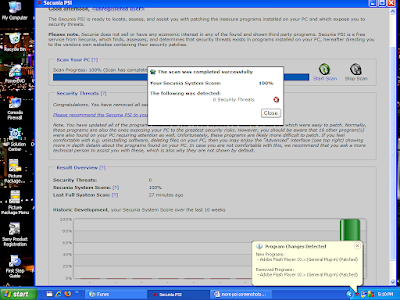
PSI will run when Windows starts up and initially will do a scan. Below is a screen shot of the PSI dashboard after scanning my PC. You will see in red the programs that are not current and in need of patching. In the “Solution” column, you can click on the blue icons and it will allow you to get the patch you need to be secure. Click all these icons to update your insecure software. After patching, PSI will rescan your system.
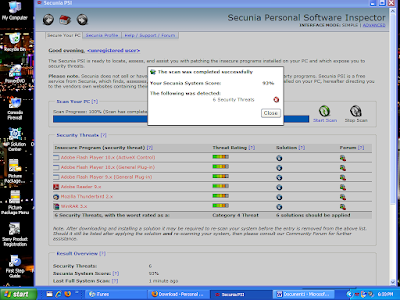

This is the screen showing your programs in need of patching. The Red bar in the graph shows you you need to take some action. Your goal is to have a Green bar that shows you are fully patched.
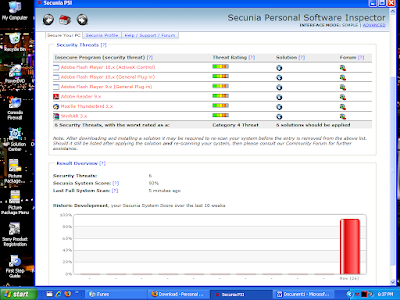

As you can see in the System Tray, if you hover your mouse over the PSI icon (the 3 red squiggly lines) it will tell you the status. Here it shows that you've just installed a more current version of a program.
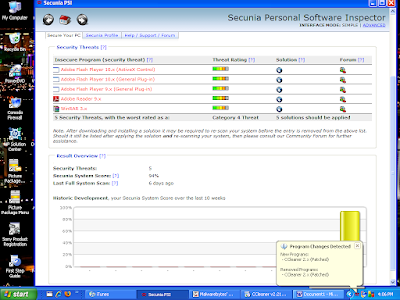

Here is an example after you've clicked on the “Solution” icon, and it gives you a dialog box that allows you to get the patch you need and you can then install it.
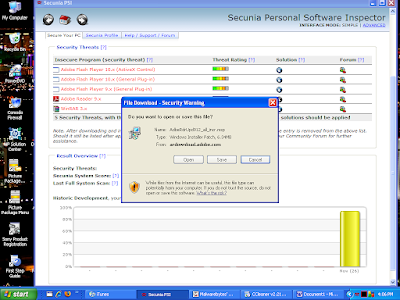

After completing your patching, your scan should then show you that you have no insecure applications. This is your goal. It is just as easy as that. If you have any questions, just get a hold of me and I will try and help.
Tuesday, July 28, 2009

Heading to Las Vegas and DefCon

In a couple of days I'll be off to DefCon 17 in Las Vegas, NV. If you aren't sure what DefCon is, it's a hacker conference. I attended my first DefCon in 2007. Got hooked, and I'll try and hit everyone in the future. This year appears to be chocked full of fabulous talks. Since it is Black Hat/DefCon time (both events held in Vegas), there will be a ton of news coming out this week. I'll try and have one more post before I head out.

Here is a reminder to all my friends who use the Windows operating system, today Microsoft will be releasing a patch which is out-of-band which means, it is not the normal second Tuesday Pat Tuesday patch. MS has patches released on the second Tuesday of every month. Only when a serious security issue arises, do they have these out-of-band pathces. So, make sure your Windows box gets it's updates tonight when you get home.

Take care and stay safe. Have a fabulous Tuesday.

Saturday, July 25, 2009

Microsoft to Issue Out-of-Band Patch

Next Tuesday, Microsoft has announced that they will be coming out with an out-of-band patch next week(072909). If you don't have updates downloaded automatically, you may want to start checking for update on Tuesday after you get home from work.

This will be only the third time that Microsoft has issued an out-of-band security patch in the past 25 months. This of course is due to the seriousness of the vulnerability that is currently being exploited by the bad guys out there in the Internet world. If you aren't familiar with Microsoft's schedule, they regularly schedule patches to be released on the second Tuesday of each month. This allows business to react, and prepare for their release.

Stay safe out there and have a fabulous weekend!!

Wednesday, July 22, 2009

Promise of Erin Andrews Video Leads to Malware

If you don't know who Erin Andrews is, she is a reporter for ESPN. She is very attractive and she has been captured in a video in the nude, and the video has been posted on the Internet. Erin and her lawyer have promised to sue whoever may be distributing the video so it isn't easy to find.

However, the cyber criminals know that men will be men and they have put up fake sites that purportedly host the infamous video of Erin Andrews. And it doesn't matter if you are surfing on a MAC or a Windows PC, you will be owned if you try and visit these sites. You won't get to see the video, and on top of that, you have malicious software downloaded to your PC so my advice to all men out there, don't go looking. This is like a broken record how the attack is done. You click, and a fake video player is needed to view the video Andrews naked.

So stay safe out there. Your behavior on the Internet has a lot to do with if you run into the nasty stuff the cyber criminals are offering. Play it smart. Don't go looking for the Erin Andrews video. If you do, you probably won't get what you are looking for. Happy Hump Day and take care.

Sunday, July 19, 2009

Firefox 3.5.1 Has Serious Vulnerability

Well, Friday, the Firefox browser came out with a patch for a vulnerability that was announced last Monday. OK, I thought cool. They patch fast. Well, I mean the next day, it was announced that the newly released version of the Firefox browser has a serious vulnerability.

The Internet Storm Center has a write up on this you can read. Click here to read that post in the ISC Diary.

Hope your weekend was fabulous. Monday is just around the corner. Be on the watch for a patch for the Firefox browser soon. I'll let you know. Stay safe.

Friday, July 17, 2009

Another Reason to use Firefox Browser

Last week and this week, Microsoft has had two pretty serious 0-day vulnerabilities that allowed an attacker to get the ability to run code on the target PC. Now with Patch Tuesday being this week, Microsoft was able to correct the DirectShow fix on Tuesday. However, the new one that I wrote about in the previous post is not. One wonders how long it will be before a patch is in place.

Now, proof there is another reason you really should be using the Firefox browser as your primary browser. Early this week, it was announced that Firefox had a serious 0-day. I have stated in the past, there really isn't a browser out there that doesn't have problems with security vulnerabilities. However, the key is, how quickly do they get patched. The window of opportunity for bad guys to take advantage of 0-day vulnerabilities in Firefox are just smaller. Today, if you are a Firefox user, make sure you get the update 3.5.1 that will correct the current problem.

If you don't use Firefox, try it. It is free and has some great addon's that you can use to protect yourself more. I personally use Noscript which I recommend you do too.

OK, have a fabulous Friday and stay safe out there.

Monday, July 13, 2009

Microsoft Announces ANOTHER 0-Day

OK, the last post was an article on a 0-day vulnerability in the DirectShow ActiveX control. I pointed you to a work-around until they will patch the problem. Sounds like they will be patching it tomorrow (Patch Tuesday). On the heels of that announcement, Microsoft says there is another 0-day in their Office products. It works the same. Bad guys will compromise sites that re-direct you to their malicious site. If they can get you there, your PC will be compromised. Really bad stuff.

The Internet Storm Center has a great write up here on this problem and also gives a link for you to "Fix It" which is similar to the work-around for last week. If you use Internet Explorer you will really want to visit the ISC link and click on the "Fix It" link. Another work-around, is to use an alternative browser like FireFox. I recommend it.

Stay safe, and have a fabulous week. Happy Patch Tuesday for all you Microsoft users!

Wednesday, July 8, 2009

Microsoft Warning Users of Unpatched Flaw

The folks from Redmond, Washington (MS) are warning folks that cyber criminals are targeting a previously unknown security vulnerability in Windows XP and Server 2003 to compromise PC's. Microsoft has instructions on how to protect yourself from this flaw.

Microsoft said that the vulnerability can be used to install malware on the victim PC if they can get you to browse to a hacked or booby trapped Web site that the criminal controls. The Internet Storm Center is warning folks to take action now due to a report that thousands of newly compromised Web sites have been seeded with the exploit code for this vulnerability. The ISC is also reporting that the exploit code has been posted to numerous Web sites in China. Symantec is reporting that one site that is now seeding this attack is the Russian Embassy in DC.

The flaw is in Internet Explorer versions 6 or 7. Seems that Internet Explorer 8 is not vulnerable to this attack.

Microsoft says that the problem lies in the DirectShow ActiveX Control. They are reportedly working on this to get a patch released soon. The normal Microsoft patch cycle is due to be released on the second Tuesday of July. Not really sure that they will be able to get a patch ready by this date so they are recommending to folks that they should consider disabling the feature because there doesn't seem to be any by-design uses for this ActiveX control in IE (Internet Explorer). Most folks out there use IE as their default browser so this is VERY important. To enable the Microsoft work around, click here, then click on the "Fix This Problem" icon.

Microsoft is also saying that "while Windows Vista and Windows Server 2008 customers are not affected by this vulnerability, we recommend that they also implement the workarounds as a defense-in-depth measure." To read more information on this topic, click here to view the Internet Storm Center post.

Stay safe out there and if you are on the vulnerable systems, take this action now. Have a fabulous rest of the week.