OK, I jumped at the chance to download the new updated Adobe Reader that is introducing sandboxing. I haven't had too much of a chance to play with it yet, but one thing I've noticed right away is some settings I changed a long time ago. I've written about those setting changes in earlier blog posts and can be found here and here.
Once you changed these settings, any updates to Reader would carry those changes through the next version released. I did notice that on Adobe Reader X, these settings went back to their default value you so you will want to repeat the steps detailed in the previous blog posts related to disabling Javascript and disabling the setting under Trust Manager.
Stay safe out there.
Showing posts with label Adobe Reader/Acrobat. Show all posts
Showing posts with label Adobe Reader/Acrobat. Show all posts
Sunday, November 21, 2010

Friday, November 12, 2010
How to Stay Safer Online
So to understand how you can protect yourself against the malicious attackers looking to install their malware on your PC, you have to know what programs attackers are exploiting. Keeping your software up to date with security patches is vital. The top applications that attackers are having success with when it comes to running exploits on your PC include the following:
It is also important to have some sort of anti-virus installed on your PC and it should be set up to scan on a regular schedule and keep the signatures up to date. I also recommend that you install a great malware removal tool called Malwarebytes Anti-malware. Download and install the free version. You can find it here.
Lastly, your actions can go a long ways in keeping malware off your PC. Knowing if you should click or not IS a really big deal. If something doesn't look right it probably isn't.
These are just a few steps you can take to keep malicious software from being installed on your PC. Protect your family and your financial health from the cyber attackers. Stay safe out there.
- Java Runtime Engine (JRE)
- Adobe Reader/Acrobat
- Adobe Flash Player
It is also important to have some sort of anti-virus installed on your PC and it should be set up to scan on a regular schedule and keep the signatures up to date. I also recommend that you install a great malware removal tool called Malwarebytes Anti-malware. Download and install the free version. You can find it here.
Lastly, your actions can go a long ways in keeping malware off your PC. Knowing if you should click or not IS a really big deal. If something doesn't look right it probably isn't.
These are just a few steps you can take to keep malicious software from being installed on your PC. Protect your family and your financial health from the cyber attackers. Stay safe out there.
Wednesday, August 18, 2010
Adobe Updates
Time to update again. Adobe has a patch available now for Flash Player and Adobe Reader/Acrobat will have an update sometime tomorrow. It is critical that you patch these as attackers are using exploits against Adobe applications to install their malicious software.
Thursday, April 22, 2010
Adobe Reader Setting to Change
So you need to know what the criminal attackers are exploiting so you can defend against it. Adobe Reader/Acrobat and Adobe Flash are at the top of the list. Earlier I wrote about turning off Javascript in Adobe Reader in this post. I come to you with another setting to change. Pull up your Adobe Reader and then go to Edit>Preferences:
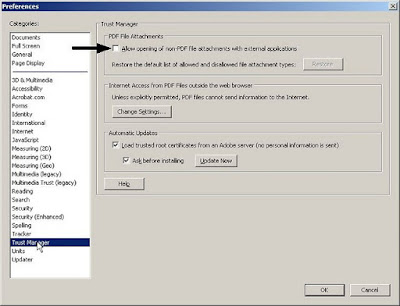
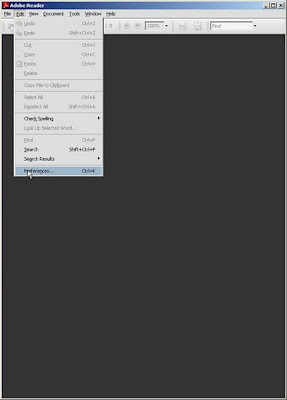 Find the category Trust Manager and highlight it, then uncheck the box seen below in this image.
 Trying to stay secure is always a moving target. Setting these options as I have mentioned will help protect against current attacks going on now in the wild.
Stay safe and have a great weekend.


 Find the category Trust Manager and highlight it, then uncheck the box seen below in this image.
 Trying to stay secure is always a moving target. Setting these options as I have mentioned will help protect against current attacks going on now in the wild.
 Stay safe and have a great weekend.
Tuesday, June 9, 2009
June's Patch Tuesday
It's patch Tuesday for all you Microsoft users. That accounts for most computer users. If you don't have your computer set to download your patches automatically, you ought to go do that right now. This month is a busy Patch Tuesday. Also today is the start of Adobe pushing out regular updates to their software. We'll see how this goes. Adobe has a horrible reputation at this point when it comes to having vulnerable software (Adobe Reader, Acrobat, etc.) that the bad guys are using regularly. Hopefully this is a start to making a bad situation better.
Have a great week!
Have a great week!
Wednesday, March 11, 2009
Adobe Patches Version 9
Adobe has released a patch for the Adobe Reader/Acrobat for their version 9 of the software. Coming soon are patches for versions 7 and 8. If you have version 9, go patch. Stay safe.
Saturday, February 28, 2009
Adobe, Microsoft, Facebook
Well this week has been all about the Adobe Reader/Acrobat 0day vulnerability, but Adobe did release updates to Flash this week. Along with the 0day that Adobe has, word comes out that Microsoft has their own 0day vulnerability that is being seen in only targeted attacks.
Really the best defense against these types of attacks is YOU. You have to decide if you are going to click on either a link that takes you to a document either through e-mail or a web site. Trust no one is my best advice.
Now turning to Facebook. This past week there have been a couple of apps that folks fall for. Both attacks are types of social engineering that try to get you to enter your login credentials. Folks, if you are already logged on to Facebook or whatever other site you are on and you click something that prompts you to login, DON'T DO IT!! Something is wrong with that scenario.
OK, hope you all are having a fabulous weekend and snow sucks. Stay safe and Rock Chalk Jayhawk!!
Really the best defense against these types of attacks is YOU. You have to decide if you are going to click on either a link that takes you to a document either through e-mail or a web site. Trust no one is my best advice.
Now turning to Facebook. This past week there have been a couple of apps that folks fall for. Both attacks are types of social engineering that try to get you to enter your login credentials. Folks, if you are already logged on to Facebook or whatever other site you are on and you click something that prompts you to login, DON'T DO IT!! Something is wrong with that scenario.
OK, hope you all are having a fabulous weekend and snow sucks. Stay safe and Rock Chalk Jayhawk!!
Friday, February 20, 2009
Adobe Reader and Acrobat Being Exploited
Thursday, the folks at Adobe announced that there was a vulnerability that is currently being exploited in all version 9 and earlier. The security group over at Shadowserver.org has been seeing targeted attacks that exploit this vulnerability that allows an attacker remote code execution. That sucks.
Brian Krebs from SecurityFix blog has a write up that you can read more details. Brian does a fabulous job keeping folks informed of computer security issues. Click here to read his post about the Adobe vulnerability. Adobe has a write up on their site too and you can click here to read that post.
As always you should never click on attachments or links in unsolicited e-mails. Stay safe and have a fabulous weekend.
Brian Krebs from SecurityFix blog has a write up that you can read more details. Brian does a fabulous job keeping folks informed of computer security issues. Click here to read his post about the Adobe vulnerability. Adobe has a write up on their site too and you can click here to read that post.
As always you should never click on attachments or links in unsolicited e-mails. Stay safe and have a fabulous weekend.
Subscribe to:
Posts (Atom)