So you ever hear news about a celebrity or a current news event, and you want to find out more information so you go do a Google search on the topic? Bad guys know this and will take advantage of tragedy to spread their malware. Check out this video to see how to keep yourself safe based on you inspecting the results you get back closely.
Sunday, February 28, 2010

Saturday, January 30, 2010
Adobe Reader Settings
So you want an added layer of protection against the bad guys? Go now to your Adobe reader and open it up and go to HELP on the toolbar and then select Check for Updates... If there is an update, then do it!


After you get it updated, open the Adobe Reader application up again and on the toolbar go to Edit, then Preferences...

This will open another window where you need to look down at the left hand margin and select JavaScript, then uncheck the box Enable Acrobat JavaScript.

If you are like me, almost all will not be affected by having this option turned off. I am aware that the www.irs.gov has forms that do require you to have this enabled. Bad guys like to create malicious malformed PDF documents that are many times related to JavaScript. The good news is from this point on, when you update Adobe Reader, it will retain this setting. The only time you will ever need to change this setting is when you receive a PDF document who you absolutely trust the
person who is sending it to you.
After you get it updated, open the Adobe Reader application up again and on the toolbar go to Edit, then Preferences...
This will open another window where you need to look down at the left hand margin and select JavaScript, then uncheck the box Enable Acrobat JavaScript.
If you are like me, almost all will not be affected by having this option turned off. I am aware that the www.irs.gov has forms that do require you to have this enabled. Bad guys like to create malicious malformed PDF documents that are many times related to JavaScript. The good news is from this point on, when you update Adobe Reader, it will retain this setting. The only time you will ever need to change this setting is when you receive a PDF document who you absolutely trust the
person who is sending it to you.
Sunday, December 27, 2009
How To: Documentation for using Secunia's PSI
When I'm asked to clean up a machine that runs the Windows operating system, I normally install an application from Secunia called Personal Software Inspector (PSI). Below is the documentation that I give them on how to use PSI.
I have downloaded a program on your PC called Secunia Personal Software Inspector. It was downloaded from http://secunia.com/vulnerability_scanning/personal/ and it will help keep software on your PC up to date. This is important because vendors are always making security updates that will close vulnerabilities that hackers can use to take control of your PC. Many vendors have started to put an automated process similar to the Microsoft Automatic Updates in place because most people will never update their software on their own.
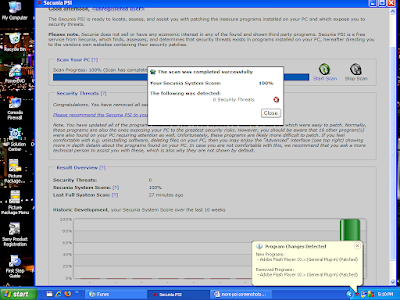
PSI will run when Windows starts up and initially will do a scan. Below is a screen shot of the PSI dashboard after scanning my PC. You will see in red the programs that are not current and in need of patching. In the “Solution” column, you can click on the blue icons and it will allow you to get the patch you need to be secure. Click all these icons to update your insecure software. After patching, PSI will rescan your system.
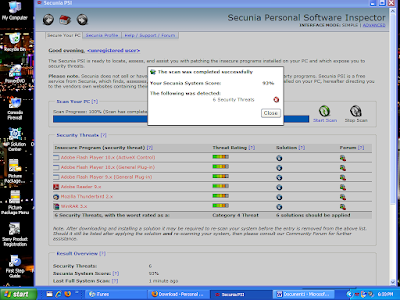
This is the screen showing your programs in need of patching. The Red bar in the graph shows you you need to take some action. Your goal is to have a Green bar that shows you are fully patched.
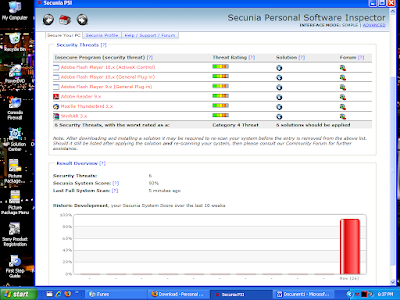
As you can see in the System Tray, if you hover your mouse over the PSI icon (the 3 red squiggly lines) it will tell you the status. Here it shows that you've just installed a more current version of a program.
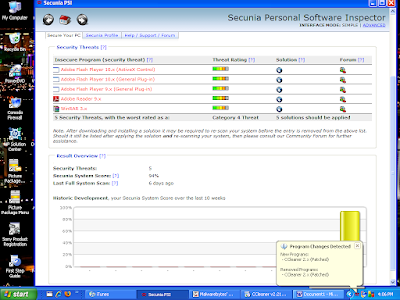
Here is an example after you've clicked on the “Solution” icon, and it gives you a dialog box that allows you to get the patch you need and you can then install it.
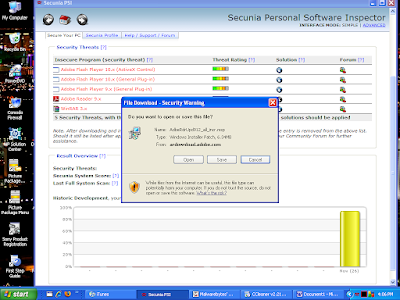
After completing your patching, your scan should then show you that you have no insecure applications. This is your goal. It is just as easy as that. If you have any questions, just get a hold of me and I will try and help.
I have downloaded a program on your PC called Secunia Personal Software Inspector. It was downloaded from http://secunia.com/vulnerability_scanning/personal/ and it will help keep software on your PC up to date. This is important because vendors are always making security updates that will close vulnerabilities that hackers can use to take control of your PC. Many vendors have started to put an automated process similar to the Microsoft Automatic Updates in place because most people will never update their software on their own.
PSI will run when Windows starts up and initially will do a scan. Below is a screen shot of the PSI dashboard after scanning my PC. You will see in red the programs that are not current and in need of patching. In the “Solution” column, you can click on the blue icons and it will allow you to get the patch you need to be secure. Click all these icons to update your insecure software. After patching, PSI will rescan your system.

This is the screen showing your programs in need of patching. The Red bar in the graph shows you you need to take some action. Your goal is to have a Green bar that shows you are fully patched.

As you can see in the System Tray, if you hover your mouse over the PSI icon (the 3 red squiggly lines) it will tell you the status. Here it shows that you've just installed a more current version of a program.

Here is an example after you've clicked on the “Solution” icon, and it gives you a dialog box that allows you to get the patch you need and you can then install it.

After completing your patching, your scan should then show you that you have no insecure applications. This is your goal. It is just as easy as that. If you have any questions, just get a hold of me and I will try and help.

Tuesday, July 28, 2009
Heading to Las Vegas and DefCon
In a couple of days I'll be off to DefCon 17 in Las Vegas, NV. If you aren't sure what DefCon is, it's a hacker conference. I attended my first DefCon in 2007. Got hooked, and I'll try and hit everyone in the future. This year appears to be chocked full of fabulous talks. Since it is Black Hat/DefCon time (both events held in Vegas), there will be a ton of news coming out this week. I'll try and have one more post before I head out.
Here is a reminder to all my friends who use the Windows operating system, today Microsoft will be releasing a patch which is out-of-band which means, it is not the normal second Tuesday Pat Tuesday patch. MS has patches released on the second Tuesday of every month. Only when a serious security issue arises, do they have these out-of-band pathces. So, make sure your Windows box gets it's updates tonight when you get home.
Take care and stay safe. Have a fabulous Tuesday.
Here is a reminder to all my friends who use the Windows operating system, today Microsoft will be releasing a patch which is out-of-band which means, it is not the normal second Tuesday Pat Tuesday patch. MS has patches released on the second Tuesday of every month. Only when a serious security issue arises, do they have these out-of-band pathces. So, make sure your Windows box gets it's updates tonight when you get home.
Take care and stay safe. Have a fabulous Tuesday.
Saturday, July 25, 2009
Microsoft to Issue Out-of-Band Patch
Next Tuesday, Microsoft has announced that they will be coming out with an out-of-band patch next week(072909). If you don't have updates downloaded automatically, you may want to start checking for update on Tuesday after you get home from work.
This will be only the third time that Microsoft has issued an out-of-band security patch in the past 25 months. This of course is due to the seriousness of the vulnerability that is currently being exploited by the bad guys out there in the Internet world. If you aren't familiar with Microsoft's schedule, they regularly schedule patches to be released on the second Tuesday of each month. This allows business to react, and prepare for their release.
Stay safe out there and have a fabulous weekend!!
This will be only the third time that Microsoft has issued an out-of-band security patch in the past 25 months. This of course is due to the seriousness of the vulnerability that is currently being exploited by the bad guys out there in the Internet world. If you aren't familiar with Microsoft's schedule, they regularly schedule patches to be released on the second Tuesday of each month. This allows business to react, and prepare for their release.
Stay safe out there and have a fabulous weekend!!
Wednesday, July 22, 2009
Promise of Erin Andrews Video Leads to Malware
If you don't know who Erin Andrews is, she is a reporter for ESPN. She is very attractive and she has been captured in a video in the nude, and the video has been posted on the Internet. Erin and her lawyer have promised to sue whoever may be distributing the video so it isn't easy to find.
However, the cyber criminals know that men will be men and they have put up fake sites that purportedly host the infamous video of Erin Andrews. And it doesn't matter if you are surfing on a MAC or a Windows PC, you will be owned if you try and visit these sites. You won't get to see the video, and on top of that, you have malicious software downloaded to your PC so my advice to all men out there, don't go looking. This is like a broken record how the attack is done. You click, and a fake video player is needed to view the video Andrews naked.
So stay safe out there. Your behavior on the Internet has a lot to do with if you run into the nasty stuff the cyber criminals are offering. Play it smart. Don't go looking for the Erin Andrews video. If you do, you probably won't get what you are looking for. Happy Hump Day and take care.
However, the cyber criminals know that men will be men and they have put up fake sites that purportedly host the infamous video of Erin Andrews. And it doesn't matter if you are surfing on a MAC or a Windows PC, you will be owned if you try and visit these sites. You won't get to see the video, and on top of that, you have malicious software downloaded to your PC so my advice to all men out there, don't go looking. This is like a broken record how the attack is done. You click, and a fake video player is needed to view the video Andrews naked.
So stay safe out there. Your behavior on the Internet has a lot to do with if you run into the nasty stuff the cyber criminals are offering. Play it smart. Don't go looking for the Erin Andrews video. If you do, you probably won't get what you are looking for. Happy Hump Day and take care.
Sunday, July 19, 2009
Firefox 3.5.1 Has Serious Vulnerability
Well, Friday, the Firefox browser came out with a patch for a vulnerability that was announced last Monday. OK, I thought cool. They patch fast. Well, I mean the next day, it was announced that the newly released version of the Firefox browser has a serious vulnerability.
The Internet Storm Center has a write up on this you can read. Click here to read that post in the ISC Diary.
Hope your weekend was fabulous. Monday is just around the corner. Be on the watch for a patch for the Firefox browser soon. I'll let you know. Stay safe.
The Internet Storm Center has a write up on this you can read. Click here to read that post in the ISC Diary.
Hope your weekend was fabulous. Monday is just around the corner. Be on the watch for a patch for the Firefox browser soon. I'll let you know. Stay safe.
Subscribe to:
Posts (Atom)