Saturday, July 24, 2010
Firewall Disabled?
I work on plenty of Windows XP machines that have got malware installed on them. Sometimes after removing the malware, you have to go into services to enable to firewall to be turned back on. How do you do this? Go to START>RUN, then type in services.msc, then scroll down to Windows Firewall/Internet Connection Sharing. If you right mouse click you should be able to start the service back up.

Monday, July 19, 2010
Malwarebytes Rocks!
You may have had malicious software installed on your PC and you have done searching and found references to Malwarebytes Anti-malware tool. Everything you read about it is true. I recommend it to all my friends. If you don't already, click here to download it and install it. There is a free version but if you are finding that you browse to somewhat risky places on the Internet, then maybe you should purchase the paid for version which gives you better protection.
Below I've listed instructions on how to use the tool.
Below I've listed instructions on how to use the tool.
- After installing, double click on the Malwarebytes Anti-malware tool and you are
presented with the Malwarebytes dashboard. - Click on the Update tab (the third tab over). Click on the "Check for Updates" button to get the new signatures for MBAM. You need to do this step every time prior to running the tool.
- After the update is complete, then click on the Scanner tab (this tab is the first you will see when opening MBAM). Select the default scanning option (Perform quick scan) and then click on the Scan button. MBAM will now start scanning your computer for malware. This process can take quite a while, so I suggest you go and do something else and periodically check on the status of the scan. When MBAM is done scanning it will present you with a message box with an OK button. It will either tell you no malicious files found, or if it finds any malicious files, it will then allow you to view the results. Click the OK button.
- If infected files are found, you will now be back at the main Scanner screen. At this point you should click on the Show Results button. A screen displaying all the malware that the program found will be displayed.
- You should now click on the Remove Selected button to remove all the listed malware. MBAM will now delete all of the infected files and registry keys. When removing the
files, MBAM may require a reboot in order to remove some of them. If it displays a message stating that it needs to reboot, please allow it to do so. If the Quick Scan
option actually found any malicious software, I always recommend that after you have removed and rebooted if needed, then repeat these steps but select the Perform full scan option. For sure this process will take longer because you are scanning your entire PC.
CCleaner Documentation
I enjoy using a tool called CCleaner. It is a great free utility that I may have suggested to you. If so, here is a link to documentation on how to use the tool CCleaner. If I haven't talked to you about it and are interested, click here to download it from CNet. Enjoy!
Click here for the documentation.
Click here for the documentation.
Wednesday, July 14, 2010
How To Identify an E-mail is Malicious
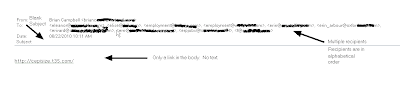
At some point, you have either been faced with or you will be faced with receiving an e-mail from someone you know personally that looks a bit odd. What are some of the things that you can look for to make that decision to click a link or not? This is an example of an e-mail that was actually delivered to a friends inbox and the link in the e-mail was a malicious download. Take a close look at the recipients list, you can see in this example that they are listed in alphabetical order. This is an indication that the attacker is sending e-mails sequentially to all contacts in a hijacked e-mail account. Most times, the SUBJECT line is blank. Another clue is there will be no text in the body of the e-mail, just a link. Remember, if you ever have a question about the validity of an e-mail, it is better to error on caution and just delete it.

Help My E-mail Account Has Been Hijacked!
Have you been told by someone you know that they think your e-mail account has been hacked? It seems like you see it more and more today where people get their e-mail accounts hijacked. E-mails are sent to everyone listed in the e-mail account's contact list that contains a link which is malicious. If any of your friends who open the e-mail from your hijacked e-mail account and they click on the link, more than likely their PC has just had some malicious payload installed on their PC. And so the cycle continues. So what do you do if your e-mail account has been hijacked? Here are some steps you can take to gain control back from the cybercriminal.
More than likely you logged into your personal e-mail account on a PC that had some sort of malicious software installed that was able to steal your login credentials for that account. If you only log into your account from your home PC, then your home PC has some sort of malicious software installed and it needs to be cleaned. Make sure you have an anti-virus product installed and that the virus signatures are current, then scan your PC and remove any malicious software that is found. If the scan comes back clean, I recommend downloading free version of Malwarebytes Anti-malware tool from http://malwarebytes.org/. Follow the instructions and remove any malicious software that is found.
Removing the malicious software is just the first step. You need to regain control of your e-mail account by doing the following steps.
1. Change the account password and make it a strong password.
2. Confirm that the "alternate e-mail address" is your other e-mail and not the criminal attacker's so that they won't be notified of the password change and other changes.
3. Change the answers to your security questions.
4. Change any other information that your e-mail account administrator would use to verify the account.
5. If all these efforts fail, open a new account, notify the e-mail administrator and your contacts, and close down the old account.
As always, the best protection from malicious software and other online attacks is to have a firewall and anti-virus software that is kept current. Also patching 3rd party applications like Adobe Reader/Flash, Java, as well as your Windows updates is critical to stay protected. Probably the best tool you have against is your "online behavior". Stay away from peer-to-peer sites where you can download "free" music and software, don't surf porn, and don't randomly click on links without checking into things. Your motto when online should be "trust no one". Combining all these will keep you protected against malicious software.
More than likely you logged into your personal e-mail account on a PC that had some sort of malicious software installed that was able to steal your login credentials for that account. If you only log into your account from your home PC, then your home PC has some sort of malicious software installed and it needs to be cleaned. Make sure you have an anti-virus product installed and that the virus signatures are current, then scan your PC and remove any malicious software that is found. If the scan comes back clean, I recommend downloading free version of Malwarebytes Anti-malware tool from http://malwarebytes.org/. Follow the instructions and remove any malicious software that is found.
Removing the malicious software is just the first step. You need to regain control of your e-mail account by doing the following steps.
1. Change the account password and make it a strong password.
2. Confirm that the "alternate e-mail address" is your other e-mail and not the criminal attacker's so that they won't be notified of the password change and other changes.
3. Change the answers to your security questions.
4. Change any other information that your e-mail account administrator would use to verify the account.
5. If all these efforts fail, open a new account, notify the e-mail administrator and your contacts, and close down the old account.
As always, the best protection from malicious software and other online attacks is to have a firewall and anti-virus software that is kept current. Also patching 3rd party applications like Adobe Reader/Flash, Java, as well as your Windows updates is critical to stay protected. Probably the best tool you have against is your "online behavior". Stay away from peer-to-peer sites where you can download "free" music and software, don't surf porn, and don't randomly click on links without checking into things. Your motto when online should be "trust no one". Combining all these will keep you protected against malicious software.
Thursday, April 22, 2010
Adobe Reader Setting to Change
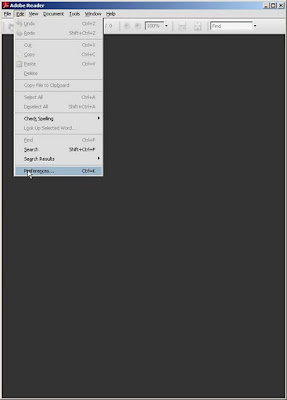
So you need to know what the criminal attackers are exploiting so you can defend against it. Adobe Reader/Acrobat and Adobe Flash are at the top of the list. Earlier I wrote about turning off Javascript in Adobe Reader in this post. I come to you with another setting to change. Pull up your Adobe Reader and then go to Edit>Preferences:
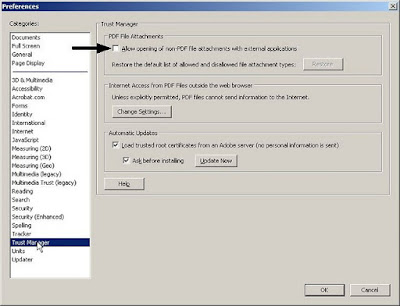
 Find the category Trust Manager and highlight it, then uncheck the box seen below in this image.
 Trying to stay secure is always a moving target. Setting these options as I have mentioned will help protect against current attacks going on now in the wild.
Stay safe and have a great weekend.


 Find the category Trust Manager and highlight it, then uncheck the box seen below in this image.
 Trying to stay secure is always a moving target. Setting these options as I have mentioned will help protect against current attacks going on now in the wild.
Stay safe and have a great weekend.
Saturday, April 17, 2010
Defending Against ZeuS Trojan
If you are a small business, school districts, local governments, or local entities like community libraries, and you have someone who works for you who transacts business with your bank online, or possibly you use ACH, you had better listen up. Cybercriminals are looking for you and they want to steal you blind. If you have heard from your local financial institution warning you about ZeuS, you need to find yourself someone who can help you defend agasint this silent attack.
Brian Krebs has a great blog and has been writing about the folks behind the ZeuS kit that is stealing literally millions of dollars each year and it doesnt seem to be getting better. ZeuS has its sights on the smaller businesses who probably don't have the computer security staff to help them take steps to lower this risk.
I'm from the northeastern part of Kansas and can help you with a risk assessment to let you know if you are at risk to ZeuS. Contact me if you would like to talk. Have a great weekend and stay safe.
Brian Krebs has a great blog and has been writing about the folks behind the ZeuS kit that is stealing literally millions of dollars each year and it doesnt seem to be getting better. ZeuS has its sights on the smaller businesses who probably don't have the computer security staff to help them take steps to lower this risk.
I'm from the northeastern part of Kansas and can help you with a risk assessment to let you know if you are at risk to ZeuS. Contact me if you would like to talk. Have a great weekend and stay safe.
Subscribe to:
Posts (Atom)