Tuesday, October 27, 2015

Tuesday, July 10, 2012
Follow a Twitter user using RSS - How To
So this isn't security related but I'm putting this in so if I ever need this, I'll have a marker to go to to copy and paste into my RSS reader. Works like a champ.
So if you want to follow someone you can use this string. Just substitute the Twitter name minus the @ at the end.
http://api.twitter.com/1/statuses/user_timeline.rss?screen_name=USERNAME
So if you want to follow someone you can use this string. Just substitute the Twitter name minus the @ at the end.
http://api.twitter.com/1/statuses/user_timeline.rss?screen_name=USERNAME
Sunday, November 28, 2010
Scan with Microsoft's Malicious Software Removal Tool
One of the tools that comes with Windows operating systems is the Malicious Software Removal Tool. It updates with the monthly MS updates and it runs a quick scan once a month. However, it may be a good idea to actually add another layer of security and run a full scan from time to time.
So how do you run this tool? First, press the Windows logo key+R. This will bring up the following window.
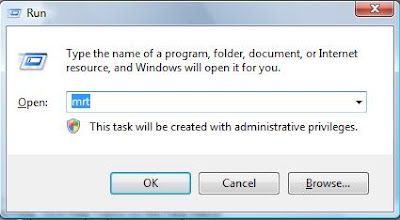 You just type 'mrt' in the input box and hit the OK button. This will bring up the dialog box for the MRT.
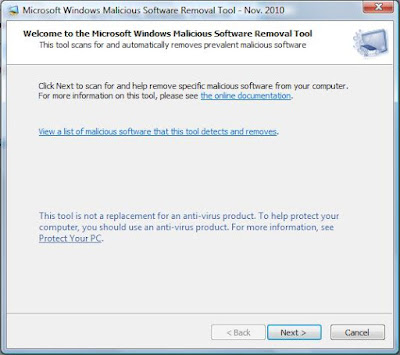 Now you just click on the Next> button and you will be presented with the following dialog box.
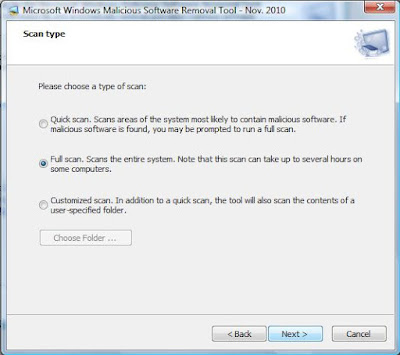 You then select the Full Scan radio button and click on the Next> button to start the scan off. It may take some time to actually complete, but this will give you another layer of security for your home PC.
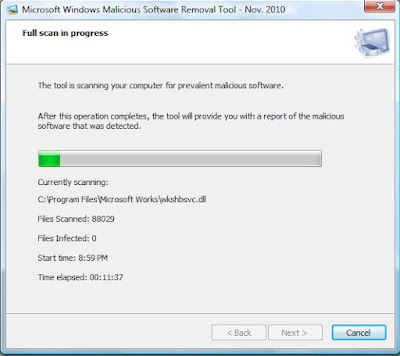
Now this will only find known software that Microsoft has added to the MRT so it isn't a silver bullet. Stay safe out there
So how do you run this tool? First, press the Windows logo key+R. This will bring up the following window.
 You just type 'mrt' in the input box and hit the OK button. This will bring up the dialog box for the MRT.
 Now you just click on the Next> button and you will be presented with the following dialog box.
 You then select the Full Scan radio button and click on the Next> button to start the scan off. It may take some time to actually complete, but this will give you another layer of security for your home PC.
Now this will only find known software that Microsoft has added to the MRT so it isn't a silver bullet. Stay safe out there
Sunday, November 21, 2010
Secunia's PSI Documentation
I've written several times in the past about the security company Secunia and the tool that they have created called PSI (Personal Software Inspector). Here is a link from bleepingcomputer.com that helps users how to use PSI. This is a tool that helps the average user to keep up to date with all those 3rd party applications like Adobe, Java, iTunes, Safari, etc. I am testing a newer version of PSI that is in Beta. This new version will have many automated updates to help the average user get through the forest of 3rd party applications. When this beta version is released, I will let you know.
The reason why this is so important is that cyber criminals are exploiting these 3rd party applications to install the malicious software that infects so many people's PCs. Be safe out there.
The reason why this is so important is that cyber criminals are exploiting these 3rd party applications to install the malicious software that infects so many people's PCs. Be safe out there.
Adobe Reader X Update
OK, I jumped at the chance to download the new updated Adobe Reader that is introducing sandboxing. I haven't had too much of a chance to play with it yet, but one thing I've noticed right away is some settings I changed a long time ago. I've written about those setting changes in earlier blog posts and can be found here and here.
Once you changed these settings, any updates to Reader would carry those changes through the next version released. I did notice that on Adobe Reader X, these settings went back to their default value you so you will want to repeat the steps detailed in the previous blog posts related to disabling Javascript and disabling the setting under Trust Manager.
Stay safe out there.
Once you changed these settings, any updates to Reader would carry those changes through the next version released. I did notice that on Adobe Reader X, these settings went back to their default value you so you will want to repeat the steps detailed in the previous blog posts related to disabling Javascript and disabling the setting under Trust Manager.
Stay safe out there.
Friday, November 12, 2010
Is that E-mail Actually from your Family Member or Friend?
You get an e-mail from a family member or friend and they have sent it to several others in the TO line of the e-mail. And many times the SUBJECT line is blank or possibly contains RE:. To top it all off, they don't type anything in the body of the e-mail. You just see a link. No explanations, just the link. So should you click it? Probably not. If you do, most likely you will be directed to some sort of Canadian Pharmacy selling Viagra or Cialis. What you don't see will harm you in ways you won't like. Malware is installed that makes your PC now under the cyber attacker's control.
To stay safe, you must make the correct decisions from time to time. And the one thing you can't do is trust that that e-mail is really from your brother, sister, or your BFF. Always question situations like these. If you are really curious, call them and ask them if they sent you something and if they did, then let them know they need to explain what they are sending you next time.
My advice when it comes to electronic communications is , trust no one. You will be better off if you take that advice.
To stay safe, you must make the correct decisions from time to time. And the one thing you can't do is trust that that e-mail is really from your brother, sister, or your BFF. Always question situations like these. If you are really curious, call them and ask them if they sent you something and if they did, then let them know they need to explain what they are sending you next time.
My advice when it comes to electronic communications is , trust no one. You will be better off if you take that advice.
How to Stay Safer Online
So to understand how you can protect yourself against the malicious attackers looking to install their malware on your PC, you have to know what programs attackers are exploiting. Keeping your software up to date with security patches is vital. The top applications that attackers are having success with when it comes to running exploits on your PC include the following:
It is also important to have some sort of anti-virus installed on your PC and it should be set up to scan on a regular schedule and keep the signatures up to date. I also recommend that you install a great malware removal tool called Malwarebytes Anti-malware. Download and install the free version. You can find it here.
Lastly, your actions can go a long ways in keeping malware off your PC. Knowing if you should click or not IS a really big deal. If something doesn't look right it probably isn't.
These are just a few steps you can take to keep malicious software from being installed on your PC. Protect your family and your financial health from the cyber attackers. Stay safe out there.
- Java Runtime Engine (JRE)
- Adobe Reader/Acrobat
- Adobe Flash Player
It is also important to have some sort of anti-virus installed on your PC and it should be set up to scan on a regular schedule and keep the signatures up to date. I also recommend that you install a great malware removal tool called Malwarebytes Anti-malware. Download and install the free version. You can find it here.
Lastly, your actions can go a long ways in keeping malware off your PC. Knowing if you should click or not IS a really big deal. If something doesn't look right it probably isn't.
These are just a few steps you can take to keep malicious software from being installed on your PC. Protect your family and your financial health from the cyber attackers. Stay safe out there.
Subscribe to:
Posts (Atom)